27. October 2026
Releasing Filmlog for Mac with MCP in the age of AI
A release that would not exist without AI — but was handcrafted nonetheless.
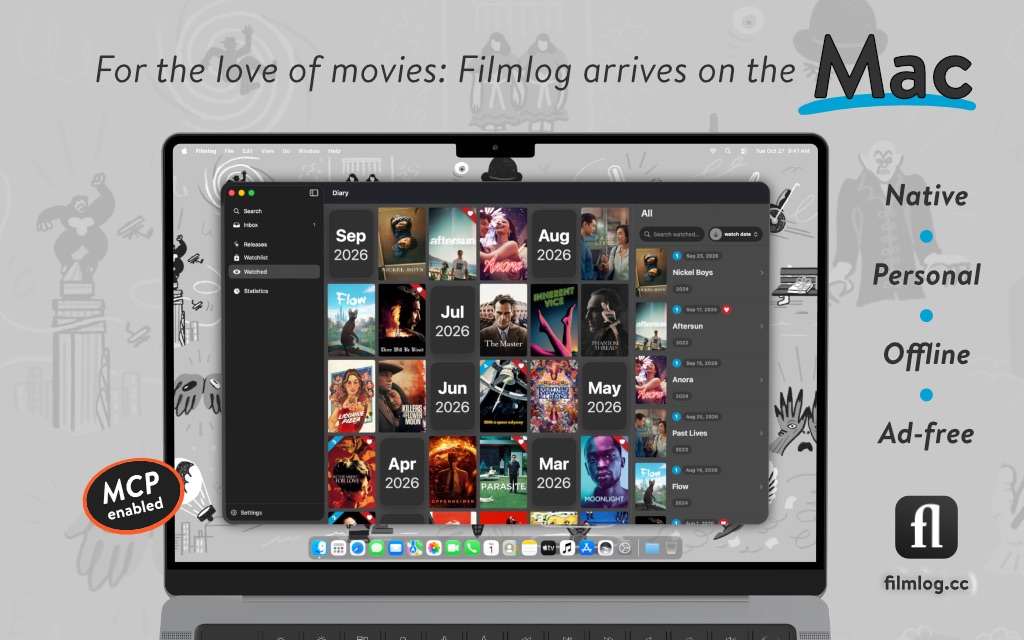
I am proud, and quite relieved, that Filmlog for Mac is out today on the Mac App Store.
It is a native Mac app for movie and cinema enthusiasts. I published the first iOS version in 2013 and spent about a year bringing it to the Mac. I also have to admit that it would not exist without AI, and I want to be honest about what that did and did not mean.
What changed in how I work
I am a self-taught programmer. For twelve years, that meant Filmlog moved at the speed of my free evenings and the occasional weekend.
Then AI coding tools got good. They were faster at typing from the start, and within months they had become far better Swift programmers than I am. Then I noticed what they are actually a fit for: I had spent years in requirements engineering, and the one thing I really know how to do is specify software. That turned out to be a pretty good match, and it removed a bottleneck I had always had. I could never afford to hire a professional, full-time developer. Now I was moving at a pace that would have needed a small team.
So I was able to put not only a lot of features, better iPad layouts and a complete offline database into the app, but also about 2,000 tests across 219 files; a screenshot pipeline that walks every screen on every platform — and, since this month, all three poses of the iPhone Duo; and a verification list that every build goes through before it ships. 665 commits since January. Testing and QA to a degree I could never have afforded alone. That was fun. Features are nice, but what I really got into was making Filmlog a piece of great, tested software.
Did it work out? Yes, I think so — though I admit I stretched my goals at times and did not always play it safe. It was simply too much fun. But I can say this: the app is better, safer and faster than before, and it crashes less. Whatever turns up, I will fix in the coming weeks. I need something to do, and something to ship updates for, no?
And still, the fear never quite leaves: that someone opens the app and it feels vibe-coded. Generated, interchangeable, not quite decided. I specified, the model implemented, the tests closed the loop. But that is not something a user can see. What a user can see is whether the thing holds together. So here are two places where you can judge that for yourself.
The catalogue lives inside the app
Most apps of this kind query a web API for every search. Filmlog ships its own catalogue: about 315,000 films, 464,000 people and 58,000 cinemas, in SQLite files bundled with the app. Search works with the network off, in 32 languages, and goes beyond the title — characters, filming locations, the book a film is based on, the subject it deals with. About 1.3 million facet rows sit behind that — hard to believe, and still incredibly fast. When you are online, results from the web are merged in.
The data comes from Wikidata and OpenStreetMap. The pipeline filters a 141 GB Wikidata dump down to JSONL, builds the tables and adds full-text indexes. Wikidata is what makes the people table deeper than an API would: roughly 110,000 of those people have no entry in the usual film database at all. A silent-era cinematographer gets a page, offline — as far as I know, only in Filmlog.
The cost is size: about 396 MB for the films and 63 MB for the cinemas, and a rebuild means re-shipping both with an update. I think the trade is right for an app whose point is that your library is yours and works in a cinema basement without reception. The posters will have to wait until you are online again, of course.
An MCP server that answers from this Mac
The Mac app includes an MCP server. Point Claude Desktop, or any client that speaks the protocol, at it, and you can ask about your own viewing history — what you watched last winter, which Kurosawa films you still haven't seen — and, if you allow it, have the client add to your watchlist, rate a film, follow a person or pin a cinema.
The server is a separate, sandboxed helper inside the app bundle. It reads a JSON snapshot the app exports, plus its own copy of the catalogue — it only ever reads. A proposed change goes into an outbox; the app picks it up, runs it through the same code the interface uses, and the change waits in Filmlog for your approval. Everything in that path stays on your Mac — which is also why the feature exists only on the Mac: that is where the client runs. There is also a change log, a toggle to explicitly allow writes, and a change manager to revert anything the MCP client initiated. Handy. The setup guide has questions to try.
Smaller things, same principle
Challenges are intentional film lists. Think of them as a to-do list with a goal and a progress bar. Sharing one packs the entire list into the link itself; whoever opens it starts with their own copy. Share your nicest lists — people without Filmlog can still look at them in the browser before they're convinced to download the app.
The business model
Freemium. The watchlist, the diary, soundtracks and export are free. Filmlog Plus — a monthly or yearly subscription, or a lifetime purchase if you prefer — adds the full search and releases, sync across devices, statistics and widgets, the MCP server, and import from other apps, which moves to the free tier with the next update, 2026.10.1. Every plan includes Family Sharing. The app is paid for by the people who use it — that is how I wanted it to be.
If you try it, tell me what you love, what breaks — and whether it feels decided. That is the one review I cannot write myself.
Give it a shot
Thank you to my family, who supported me all the way. I could not have done this without you. With gratitude.